Showing posts with label apt. Show all posts

Monday, 22 June 2015

Install Synaptic Package Manager in Kali Linux

About  Synaptic Package Manager
Synaptic Package Manager is GTK+- based GUI for apt (Advance Packaging Tool)- the package management used by Debian and its derivatives. Synaptic Package Manager- a very handy tool, used to install, remove and update software packages and add repositories. Though, based on deb packages but can be used on the system bsed on RPM packages.

Features
  • Install, remove, upgrade and downgrade single and multiple packages System-wide upgrade
  • Package search utility
  • Manage package repositories
  • Find packages by name, description and several other attributes
  • Select packages by status, section, name or a custom filter
  • Sort packages by name, status, size or version
  • Browse available online documentation related to a package
  • Download the latest changelog of a package
  • Lock packages to the current version
  • Force the installation of a specific package version
  • Undo/Redo of selections
  • Built-in terminal emulator for the package manager
  • Allows creation of download scripts
I have tested it on Kali Linux 1.1.0a machine with 32-bit architecture. To begin installing Synaptic Package Manager on your system, 

1. Please add below two repositories

deb http://http.kali.org/kali kali main non-free contrib 
deb http://security.kali.org/kali-security kali/updates main contrib non-free

to sources.list file (path: Computer -> File System -> etc -> apt -> sources.list). Save the file and exit. To know more on Kali Linux repositories please check my post, Kali Linux Repositories.

Note: Before saving sources.list file, make sure that it shouldn't have duplicate entries of  repository/ ies or else you may get 404 error or unmet dependency error.

2. Now open terminal and type apt-get update && apt-get upgrade to update kali linux.

3. Once done, execute apt-get install synaptic and then apt-get install software-center.

Thursday, 20 June 2013

Kali Cleaner: A small cleaner for Kali Linux

What it does?
It cleans apt cache.
Remove old config files.
Remove old kernels.
Empty every trashes.

What you can do is to save the script on your Desktop. Make it executable and clean kali linux.

Ex: root@kali:~/Desktop# ./kali_cleaner.sh

Download:
https://github.com/MasterButcher/kali-cleaner

or you can use command in terminal:
git clone https://github.com/MasterButcher/kali-cleaner.git

Friday, 31 May 2013

** An Important Instruction

As kali linux is new to all of us, being a learner we all come with a new issue and try to resolve it as quickly as possible. While installing software, most of us don't know the dependency packages that are installed or removed from the system. A great feature that kali linux provide is that when we run apt command, it checks the available package/s in the repository and accordingly asks if to install. Meanwhile, it also checks the un-necessary packages that is not required. Here is a command that removes the un-necessary packages. From the root terminal window, please type apt-get autoremove. When you hit 'return' or 'enter'  key, it checks the packages that is to be removed from the system. Please read those packages carefully, before you make confirmation to remove it from the system.

Monday, 27 May 2013

How to install qbittorrent in Kali Linux

About qbittorrent: qbittorrent is a torrent client, an alternative to utorrent. It's a GUI based cross platform free software based on Qt toolkit.

We know that Kali Linux's base package is constructed in Debian, so we need to add http://http.packages.debian.org to sources.list file. To do this,

1. open any text editor and edit sources.list file, located in /etc/apt directory, with an entry deb http://http.packages.debian.org import deb packages.


2. type apt-get install qbittorrent on the root terminal window and press enter

3. Once qbittorrent is installed, type qbittorrent on the root terminal window and press enter

and, you are set to go.

Add Repository in Kali Linux

Kali linux is a debian base linux distribution designed for penetration testing. Here, I will give a tutorial on how to add a repository on Kali Linux 1.0.3 with ease. Repository is a archival software, where software in this archive can be retrieved by the user to use. Please click here to check for the new blog post on repository. 

1. Open root terminal and type this code.
   root@kali:~# leafpad /etc/apt/sources.list

2. Add all repositories, i.e. :

deb http://http.kali.org/ /kali main contrib non-free
deb http://http.kali.org/ /wheezy main contrib non-free
deb http://http.kali.org/kali kali-dev main contrib non-free
deb http://http.kali.org/kali kali-dev main/debian-installer
deb http://http.kali.org/kali kali main contrib non-free
deb http://http.kali.org/kali kali main/debian-installer
deb-src http://http.kali.org/kali kali-dev main contrib non-free
deb-src http://http.kali.org/kali kali main contrib non-free
deb-src http://security.kali.org/kali-security kali/updates main contrib non-free

Save the file and exit.

3. root@kali:~# apt-get update

4. root@kali:~# apt-get upgrade

Saturday, 25 May 2013

Armitage in Kali Linux

About Armitage

Armitage is a scriptable red team collaboration tool for Metasploit that visualizes targets, recommends exploits and exposes the advanced post-exploitation features in the framework. Through one Metasploit instance, your team will:
  • Use the same sessions
  • Share hosts, captured data, and downloaded files
  • Communicate through a shared event log
  • Run bots to automate red team tasks
Armitage is open source software developed by Raphael Mudge's company Strategic Cyber LLC. However, Cobalt Strike is the commercially supported big brother of Armitage.

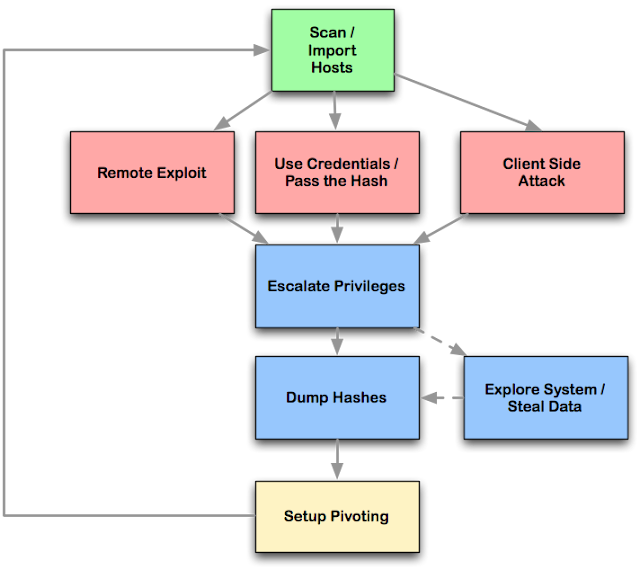
Armitage organizes Metasploit's capabilities around the hacking process. There are features for discovery, access, post-exploitation, and maneuver. This section describes these features at a high-level, the rest of this manual covers these capabilities in detail.
Armitage's dynamic workspaces let you define and switch between target criteria quickly. Use this to segment thousands of hosts into target sets. Armitage also launches scans and imports data from many security scanners. Armitage visualizes your current targets so you'll know the hosts you're working with and where you have sessions.

Armitage recommends exploits and will optionally run active checks to tell you which exploits will work. If these options fail, use the Hail Mary attack to unleash Armitage's smart automatic exploitation against your targets.

Once you're in, Armitage exposes post-exploitation tools built into the Meterpreter agent. With the click of a menu you will escalate your privileges, log keystrokes, dump password hashes, browse the file system, and use command shells.

Armitage makes it trivial to setup and use pivots. You'll use compromised hosts as a hop to attack your target's network from the inside. Armitage uses Metasploit's SOCKS proxy module to let you use external tools through your pivots. These features allow you to maneuver through the network.

The rest of this manual is organized around this process, providing what you need to know in the order you'll need it.

Package dependency before you install Armitage

Armitage exists as a client and a server that allow red team collaboration to happen. The Armitage client package is made available for Windows, MacOS X, and Linux. Armitage does NOT require a local copy of the Metasploit Framework to connect to a team server.

These getting started instructions are written assuming that you would like to connect to a local instance of the Metasploit Framework.


Armitage requires the following:
  • Metasploit Framework and its dependencies.
  • PostgreSQL Database
  • Nmap
  • Oracle's Java 1.7

To quickly install all of the dependencies, you have a few options:
  • Use a Linux distribution for penetration testing such as Kali Linux.
  • These distributions ship with Metasploit and its dependencies installed for you.
  • Use the MSF Installer Script created by DarkOperator (This option will setup an environment that uses Git for updates).
  • Use the official installer provided by Rapid7 (This option will require you to register with Rapid7 to get updates).

Setup Instructions to install Armitage in Kali Linux

  • Open a terminal
  • Initialize the database: service metasploit start
  • Stop the metasploit service: service metasploit stop
  • Extract armitage: tar zxvf armitageDDMMYY.tgz, where DDMMYY is version or date when armitage has launched.

How to Start Armitage

  • Open root terminal
  • type apt-get install armitage
    Before you start Armitage, make sure the postgresql database is running:
    • type service postgresql start
    If you get a missing database.yml error, type:
    • type service metasploit start